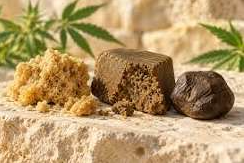
CBD hash listings often use texture and color to distinguish one product from another. One description may refer to a dry, crumbly block, while another describes a softer, darker piece. These terms help you picture the product, but the ingredient list and batch report answer a different set of questions.
What a texture description tells you
When browsing cbd hash, start by reading how the seller describes the format. Words such as pressed, sifted, and resin-style can help explain what the item looks and feels like. Photos also help, particularly when they show the actual package alongside the material. Lighting and photography affect color, so use the written description and packaging details when comparing two listings.
A variety name may appear across several products. Check each product page individually to see how the seller uses that name. Two similarly named products can have different weights, ingredient lists, or reported cannabinoid values.
Look for the full ingredient list
Read the ingredients before comparing products by strength or price. Look for a clear description of the base material and any declared additions. If a name suggests a flavor, the ingredients may explain whether it comes from an added component. This is also where you can check whether a product meets any ingredient preferences you have.
Check net weight separately. Thumbnail photos make differently sized packages look similar. Use the weight shown in the product details and confirm it matches the option selected in the listing.
See also: Evaluating Technical Trends: 965224717, 944341227, 625152560, 6993837846, 606690418, 955440694
Use the report to identify the batch
A helpful certificate of analysis identifies the sample, testing date, and tested batch. Match that information with the label or listing. When a report shows multiple cannabinoid figures, read each row with its unit. A number given as a percentage describes something different from one given in milligrams for the entire package.
Texture, ingredients, weight, and batch data each explain a different part of the listing. Reading them together gives you a clearer sense of the product than relying on its color or name alone.
Review the package and variant together
Product photos may show one sample even when a listing offers several package sizes. Check whether the page identifies which variant the photo represents. A useful label includes the product name, net weight, and a lot reference you can look up later. When only the front of the package appears in a photo, read the product details for information that might be printed on the back.
If the seller offers a variety pack, see whether the weight refers to each individually labeled piece or to the whole set. This matters when you calculate the cost per gram or compare the set with a single product. The quantity shown in the cart may count packages, while the product page lists grams per package.
Make comparisons using the same fields
Choose two listings and write down the price, package weight, ingredients, and report date for each. If one listing gives a cannabinoid figure for an entire package and the other gives a percentage, note the difference before comparing the numbers. Leave any missing field blank. The gap itself tells you what information you would need to ask for.
A useful final check is to compare the selected variant with the order summary. Look for the same product name and amount in both places. If the seller has reused a name across multiple products, the variant and weight can help you identify the exact listing again.